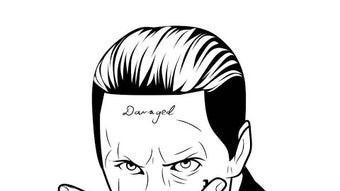

Draw Joker Face with Simple Tools
Overview
The How to Draw Joker Face APK is a mobile application designed for creative expression, specifically tailored for users interested in drawing comic-style art. Developed by Siti maimunah, the app offers a straightforward platform for creating custom illustrations, particularly focusing on the iconic Joker face. It is intended for casual users and art enthusiasts seeking a fun and accessible way to engage with digital drawing during leisure time.
The application supports both freehand sketching and image import, allowing users to draw on virtual paper or incorporate existing visuals into their artwork. This functionality makes it suitable for hobbyists, students, and younger users exploring basic digital art techniques. While the developer did not provide additional details about target demographics beyond general interest, the app’s simplicity suggests it may appeal to beginners or children learning foundational drawing skills.
The app is available at no cost, making it accessible to a wide audience. It is designed to enhance creative engagement through intuitive tools and a minimal learning curve, ideal for short creative sessions or as a supplemental activity in educational or entertainment settings.
Key Features & Capabilities
- Simple Drawing Interface – The app provides an easy-to-navigate canvas with minimal distractions, enabling users to start drawing immediately without complex setup.
- Freehand Drawing Tools – Offers basic pen and line tools optimized for sketching facial features, especially suited for creating Joker-style expressions and exaggerated cartoon faces.
- Image Import Functionality – Allows users to upload existing images from their device to use as a base or reference for their drawings.
- Comic Art Focus – Designed with comic-style illustration in mind, supporting stylized lines and bold outlines commonly found in graphic storytelling.
- Zero Cost Access – Fully free to download and use, with no in-app purchases or subscription requirements.
These features support a range of creative workflows. For example, a user can import a photo of a face and trace or reimagine it in a Joker-like style. Another user might start from scratch, using the tools to sketch a whimsical, exaggerated expression. The app’s emphasis on simplicity ensures that even those with no prior drawing experience can produce satisfying results. The combination of import capabilities and intuitive tools enables both inspiration and original creation, making it a versatile tool for casual artistic exploration.
User Interface, Workflow & Performance
The user interface is structured around a central canvas, with tool selection and basic controls positioned at the top or side of the screen. Navigation is consistent across functions, with minimal menu layers, which contributes to a smooth user experience. The workflow is linear: open the app, choose to draw or import, and begin creating.
The app does not specify performance metrics, such as frame rate or responsiveness under load. However, based on its 10 MB size and mobile platform, it is likely optimized for lightweight operation on mid-range Android devices. The developer did not provide details on CPU or RAM usage, so actual performance may vary depending on device hardware.
Stability observations are limited, but the app’s small footprint suggests a low risk of crashes or lag during typical use. Users should expect standard mobile app behavior, with no reported issues related to freezing or unresponsiveness. Overall, the interface prioritizes accessibility and speed, aligning with the app’s goal of providing a frictionless creative experience.
Compatibility & System Requirements
The app is designed for Android devices and is compatible with Android 5.0 and above, based on the platform’s standard requirements. The installation size is 10 MB, which is compact and suitable for devices with limited storage space. The developer did not specify exact hardware requirements such as RAM or processor type.
It is also unclear whether the app supports tablet devices or requires specific screen resolutions. Compatibility information was partially provided, with only the OS and file size confirmed. Users should verify that their device meets the minimum Android version requirement.
The developer did not mention support for other platforms such as iOS or desktop systems. For users seeking cross-device functionality, this limitation may be a consideration. Overall, the app appears to be optimized for entry-level to mid-tier Android smartphones.
Pros and Cons
Pros
- Completely free to use with no hidden costs
- Simple, intuitive interface suitable for beginners
- Supports both drawing from scratch and image import
- Lightweight installation at just 10 MB
- Designed with comic and cartoon art in mind
Cons
- No advanced drawing tools or layers available
- Exact performance details were not specified
- Compatibility with tablets or high-resolution screens not confirmed
- Developer did not provide information on update frequency
- Limited customization options for brushes or colors
FAQ Section
Is How to Draw Joker Face APK safe to download?
The app is available through trusted Android channels and does not require root access. As it is developed by Siti maimunah and distributed as a free APK, users should ensure they download it from a reliable source to avoid modified or malicious versions.
Can I use this app offline?
Yes, the app does not require an internet connection to function. All drawing and image import features are available offline, making it ideal for use without connectivity.
Does the app support tablet devices?
Compatibility with tablets was not specified by the developer. While it may work on larger screens, official support for tablets is not confirmed.
How often are updates released?
The developer did not provide information about update frequency or release schedule. Users should monitor the source from which they downloaded the app for new versions.
What type of license does this app use?
The app is distributed as free software with no licensing restrictions. It is intended for personal and non-commercial use, and no formal license details were published.
Final Thoughts
How to Draw Joker Face APK delivers a focused and accessible experience for users seeking a simple way to create comic-style drawings, particularly centered around the Joker character. Its lightweight design, free access, and straightforward interface make it a solid choice for casual artists, students, and children. While it lacks advanced features such as layers or customizable brushes, its core purpose is well-executed with minimal friction.
The ability to import images and draw directly on the canvas enhances creative flexibility. For those looking to pass time creatively or explore basic digital art, this app offers a low-barrier entry point. It stands out in the crowded drawing app market by emphasizing fun and simplicity over complexity.
The lack of monetization through ads or in-app purchases is a notable advantage. Overall, it’s a reliable tool for light-hearted artistic expression.
Download How to Draw Joker Face APK now





.png)

